

Augmented reality calendar boosts dopamine levels
LLC “Riga Forests” spiced up a traditional corporate gift and transformed its wall calendar with augmented reality surprises.
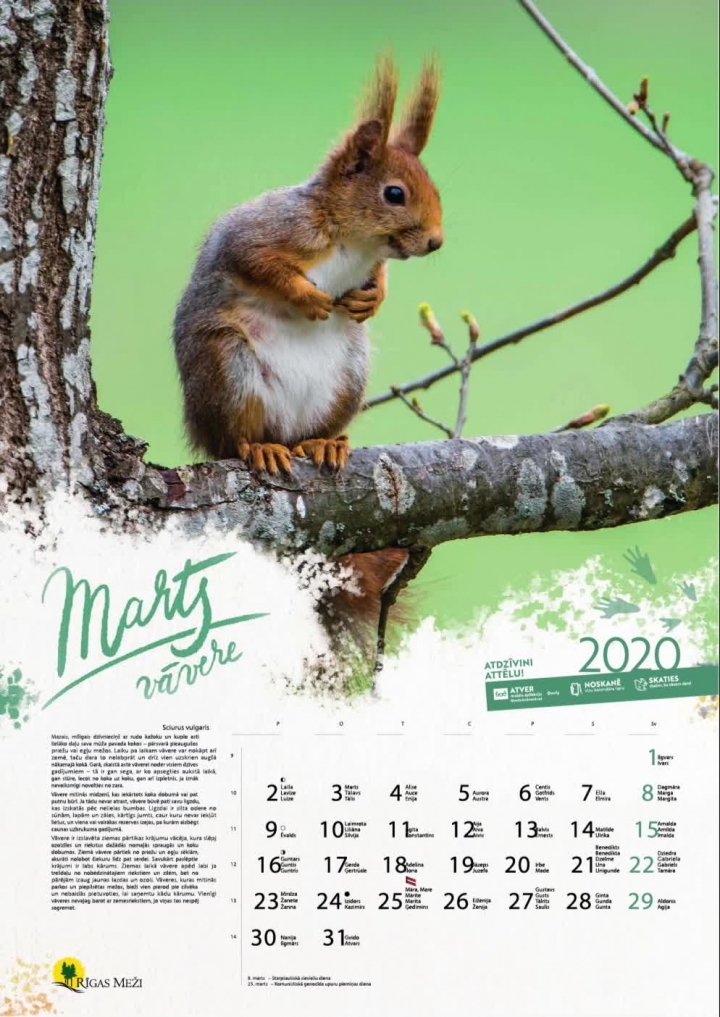
Just like most businesses out there, LLC “Riga Forests” prepares corporate gifts for its business partners and stakeholders every year. To liven up its annual gifting endeavors, the organization created an augmented reality calendar.
The AR-enhanced calendar that featured cute forest animal videos was a hit with those receiving the gift. The calendar also served as a monthly reminder of a thoughtful business partner and brought lasting positive emotions to its customers all year long.
Research from Hiroshima University reveals that most of us have a soft spot for furry cuteness and watching cute animal videos delivers our brain a minuscule blast of dopamine. Animal video experiences work the same chemical reward system activated by drugs like cocaine. It makes us come back for more before we are even conscious we want to. So this calendar is sure to cheer up an office wall just as well as fit into a client’s home and bring continuous joy to its owners.
The best thing about the Riga Forests corporate calendar is that in essence, a video-infused AR calendar is a simple idea to replicate. The organization featured existing video materials and photos from its archives. Almost everyone of us have a backlog of photos and videos in our iCloud and Google Drives. This applies to both business and personal content archives.
What is more, creating augmented reality experiences with video is extremely easy using platforms like Overly Creator. And what about printing a calendar? Anyone can do that even on low budgets using DIY online platforms that offer local or global delivery. Below we’ve included another corporate calendar example. In this example airBaltic used the behind the scenes footage of its annual calendar shoot.
A video calendar is one of the simplest AR projects you can make, and one of the longest-lasting: it stays on the wall for twelve months. Here is how we would do it:
For more tips, see how to design images that scan well.
Corporate calendars are a classic year-end gift, and AR makes yours the one people keep. Our team produces AR calendars for companies, agencies and print houses: you send the photos and videos, we deliver print-ready files with the AR set up, tested and measured. Order an AR calendar for 2027 →